Glucko
An AI-powered mobile app that simplifies diabetes management and helps users build healthier daily habits.

Role
Product Designer & Researcher
Tools
Figma, Figjam, AntiGravity, Canva, Chatgpt
How can we make managing diabetes easier and less stressful for everyday life?
Brief
Design an AI-powered mobile app that helps individuals monitor glucose, understand their health data, and maintain sustainable daily habits. Through intuitive tracking, personalized insights, and gentle guidance, the app simplifies diabetes management and reduces the mental burden of long-term care.
Setting the scene with Terri Wang
Problem Identification
Meet Terri (51), a nurse with Type 2 diabetes who works rotating hospital shifts. She values staying healthy
but struggles to maintain consistent glucose monitoring and meal routines due to her unpredictable schedule and
demanding work environment.
Her experience reflects a common challenge among many busy adults managing diabetes who need
simple tools that fit seamlessly into their daily lives.

1 in 2 adults with Type 2 diabetes struggle to consistently manage their blood sugar levels.
Problem Statement
Managing diabetes daily can be challenging due to factors such as irregular work schedules, unpredictable
meal times, stress, and difficulty interpreting glucose data.
To address these challenges, there is a need for an AI-powered mobile app that simplifies diabetes management by providing real-time insights, personalized guidance, and easy tracking of glucose, meals, and activity. By offering intuitive visualizations, gentle alerts, and actionable suggestions, the app empowers users to maintain healthier routines, reduce mental burden, and feel more confident in managing their condition.
Why would a user want to use AI?
Discovery
I interviewed 5+ target users (Age 45-50) to understand user's mentality and potential problems
Reduce Time
With the help of AI-powered algorithms, users can now perform predictive analytics faster, automate repetitive tasks, and summarize large chunks of data
Help generate solutions
AI can help generate right ideas faster and provide perspective on the problem that is being tested.
Design Principles for AI tools
Principles
AI and ML are powerful & new concepts for consumers, making UX for AI more complicated and requires design
considerations.

Generally, under-promising and over-delivering is a good way to build trust. Over time, users will learn how to best integrate the AI into their workflow.

Figure out what’s valuable, and how you can enhance the experience. Along the way, you might find a solution without AI that is easier to build or understand.

Build trust with the results
Users rely on your AI to make decisions. They have to understand the quality of results to trust them. If the confidence of your algorithm varies, indicate the confidence for each result.
Ideation Stage
Ideation
After problem discovery, market analysis, and crafting principles for AI, I brainstormed for ideas for a potential
solution.

15+ data points, 5 rounds of user interviews and card sorting later…
User Research
We found 3 key pain points
Cognitive Load from Data-Heavy Interfaces
Charts, metrics, and logs can feel overwhelming, especially when users just want quick, daily guidance.
Need for Proactive Support, Not Just Tracking
Patients need help preventing issues before they happen, rather than only reacting after glucose levels change.
Difficulty Translating Data into Action
Users can see their glucose data but don’t always know what actions to take next, leading to reactive rather than proactive management.
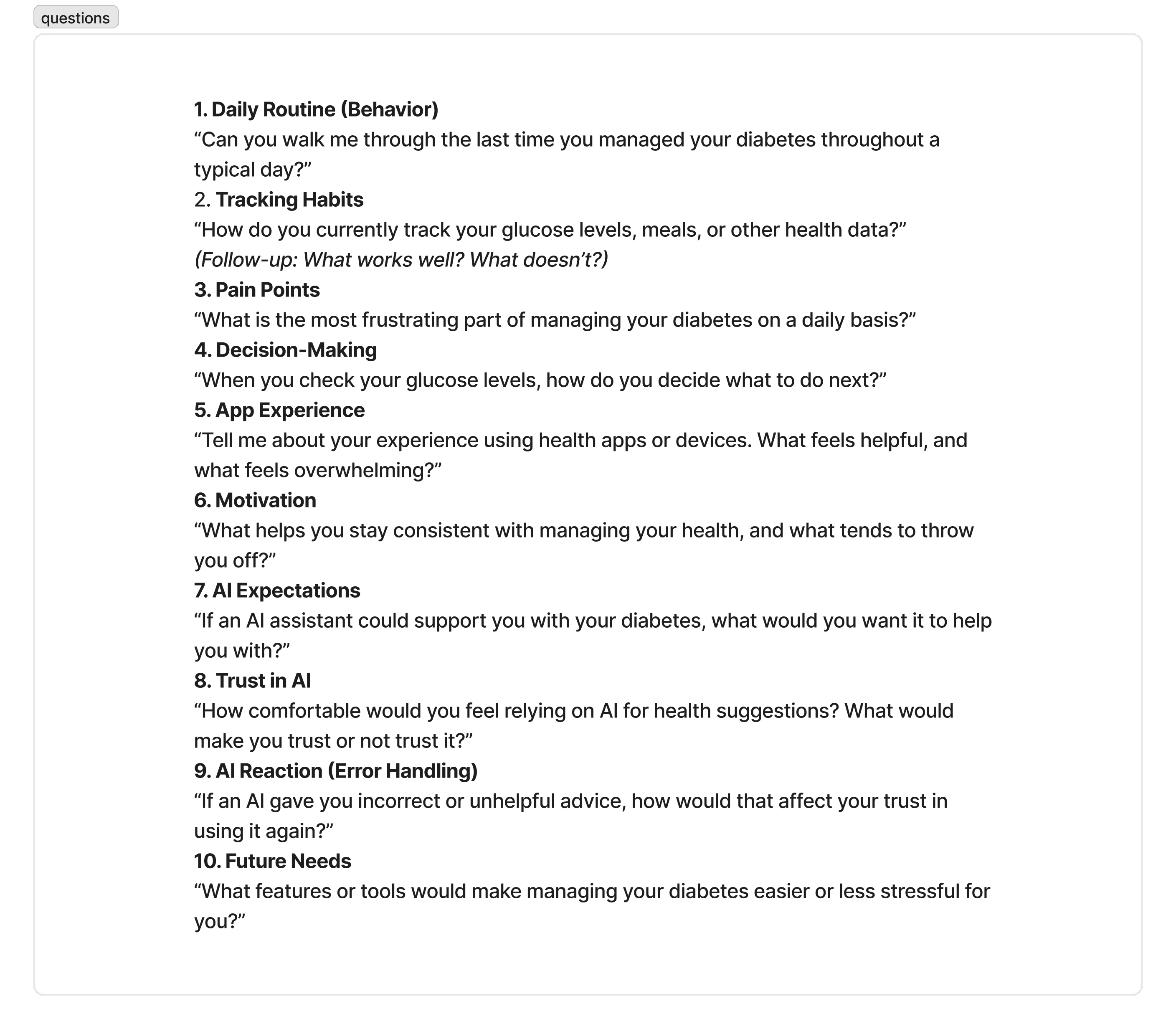
Closer/Open Card Sorting & User Interview questions


Introducing… Glucko
Solution
Small steps to greater living
Glucko is an AI-powered diabetes management app that helps users monitor glucose, understand health patterns, and make informed daily decisions through simple, real-time guidance.

Key features include:
AI-Powered Insights & Guidance
Users receive real-time, personalized insights based on their glucose, meals, and activity, with clear suggestions to help manage
levels proactively.
Book Swap Credit System
Quick, intuitive logging for glucose, meals, medication, and activity allows users to manage their health efficiently without
disrupting their routine.
Connected Care Dashboard
Health data is seamlessly shared with healthcare providers through a doctor-facing dashboard, improving communication and
enabling more informed care decisions.
User Flow & Wireframing
User flow
To explore various cases for our app, we developed a User Flow to map out actions users will take to achieve goals in
our app.
Design Pivot: Dark Mode to Light Mode Optimization
A/B testing and setbacks
A/B testing revealed that the initial dark mode design did not meet the accessibility needs of older adult users. I conducted a usability test with a diabetic older adult to validate this insight. Based on findings, I pivoted to a light mode design to improve readability and overall user experience.

Design accessibility for vision impairment
Design Process
Older adults with low vision often experience difficulty with apps due to smaller screen size & designs.
High Contrast Colors:
Ensure color choices meet WCAG accessibility standards for readability and visibility.Simplified Layouts:
Use dashboard-style interfaces to present key information clearly and reduce unnecessary navigation.Accessibility-First Design:
Designed for older adults and users with low vision, with larger text sizes and larger, easily tappable icons.

User Feedback
Feedback
I conducted a mini-usability test with a diabetic, older adult to assess my solution and create goals.
Goals:
Interface is easy to user and clear intentions.
AI Chatbot is seamlessly integrated and applicable to the majority of users across the product.
Solution is visually accessible with Glucko design systems throughout both interfaces.
Final Prototype
Final Design
I utilized Antigravity AI to create the doctor-facing database system and hosted it on Vercel.
Username/Password: Administrator: 123456/password | Hospital: General Memorial Hospital/DOC-101/password
View Website

Next steps & reflections
Reflections
This was the first opportunity I utilized Antigravity and Vercel to generate and host a website. I learned a lot and improved my coding skills through this project.
Potential Additions/Improvements:
Continue to utilize user testing and implement A/B testing to further develop features.
Guided and explanatory onboarding for the website user
Ability to give user feedback for the AI integration
Test the solution with real users